

Quick answer
What is GST multi-state registration?
Key points at a glance
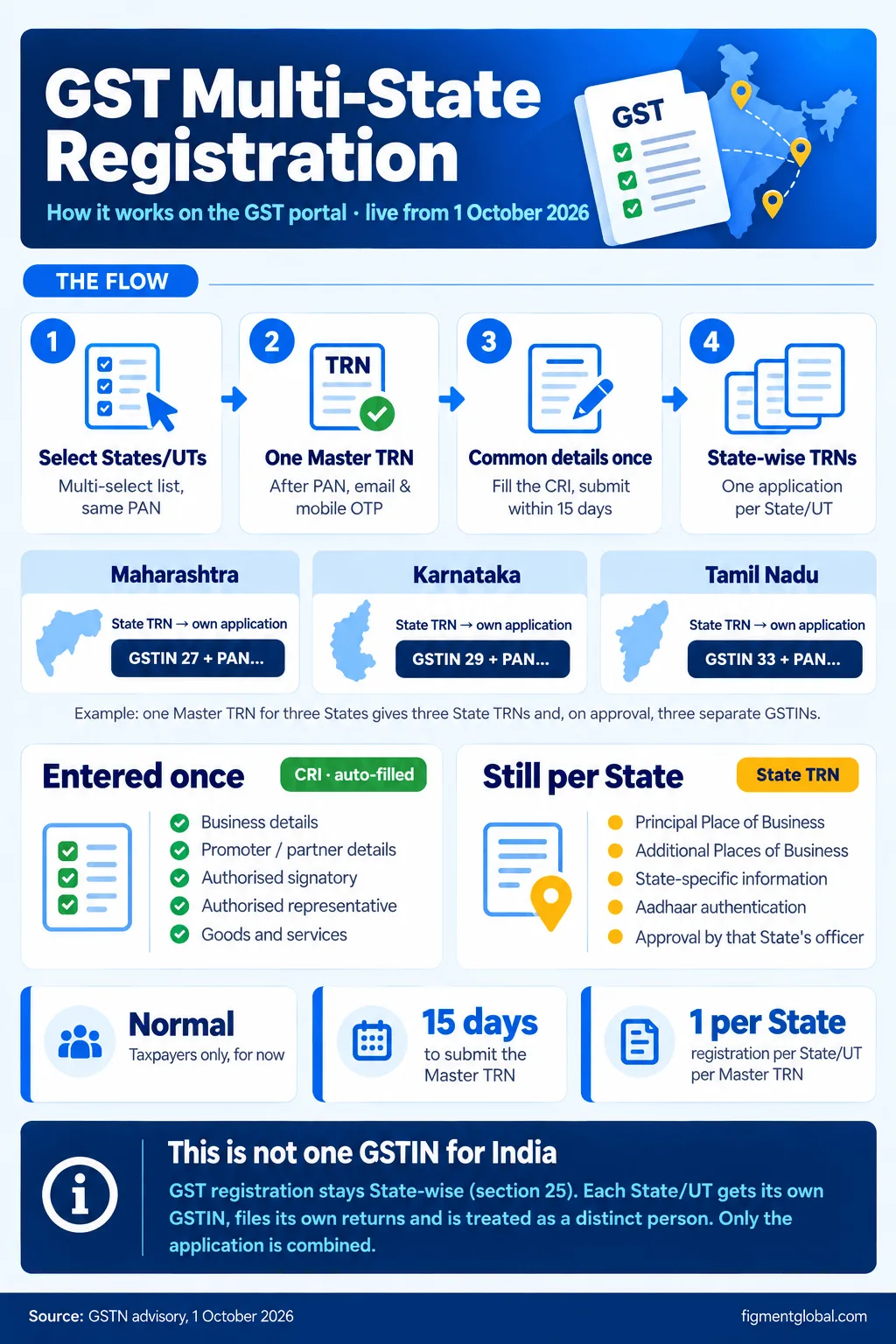
One Master TRN
Multiple States/UTs
State-wise TRNs and GSTINs
Common details entered once
Normal taxpayers only
Important: this is not one GSTIN for the whole country
Old process vs Multi-State Registration
| Point | Earlier (one application per State) | Multi-State Registration |
|---|---|---|
| Where you start | Register, separately for each State | Multi-State Registration tab on the portal home page |
| Reference number | One TRN per State, generated separately | One Master TRN for all selected States, then a TRN per State |
| Business, promoter, signatory, goods and services details | Typed again in every application | Entered once as Common Registration Information (CRI) and auto-populated |
| Place of business, State-specific details, Aadhaar authentication | Per State | Still per State, in each State TRN |
| GSTIN | One per State | Still one per State |
| Who can use it | All registration types | Normal Taxpayers only (currently) |
How to apply: step-by-step
Open Multi-State Registration
On the GST portal home page, click Multi-State Registration (it opens reg.gst.gov.in/registration/msr). The "I am a" field is fixed as Taxpayer, since the facility is only for Normal Taxpayers. Select the States/UTs
Choose every State/UT where you need registration from the multi-select list. Only one registration can be applied for in a particular State/UT using one Master TRN. Enter PAN-level details and verify OTPs
Enter the legal name of the business (as in PAN, and MCA records where applicable), PAN, email address and mobile number. Separate OTPs are sent to the email and the mobile number. Check the legal name matches PAN exactly, because it flows into every State application.
Get the Master TRN
After OTP verification, one Master TRN is generated for all the selected States/UTs. Fill the Common Registration Information (CRI)
Log in with the Master TRN and fill the details common to all States: Business details Promoter / partner details Authorised signatory Authorised representative Goods and services
Submit the Master TRN within 15 days
The Master TRN must be submitted within 15 days. Plan your documents before you start. Complete each State TRN
On submission, an individual TRN is created for each State/UT, with the CRI already filled in (you can still edit it). Then complete the State-specific parts: Principal Place of Business (PPoB) in that State Additional Places of Business (APoB), if any State-specific information Aadhaar authentication
Track each application separately
Each State application is submitted and verified on its own by that State's jurisdiction, and on approval you receive a separate GSTIN and registration certificate for each State/UT.
Documents you still need for each State
Proof of principal place of business in that State: rent or lease agreement, ownership document, electricity bill or consent letter, as applicable. Photographs and details of promoters/partners and the authorised signatory (entered once in the CRI). Authorisation (board resolution or letter of authorisation) for the authorised signatory. Aadhaar authentication for each State application, as required by the portal. Bank account details, where asked for at that stage.
Common mistakes to avoid
| Mistake | What happens | How to avoid it |
|---|---|---|
| Assuming you will get one all-India GSTIN | Invoices, returns and ITC set up wrongly | Plan for one GSTIN, one set of returns and one invoice series per State |
| Errors in the common details | The same error is copied into every State application | Review the CRI carefully before submitting the Master TRN, and correct it in each State TRN if needed |
| Missing the 15-day window for the Master TRN | You have to start again | Collect State-wise documents before generating the Master TRN |
| Trying to apply twice in one State with one Master TRN | Not allowed | Use a separate application for a second registration in the same State |
| Applying as a non-normal taxpayer | The facility is not available | TDS/TCS registrations, non-resident taxable persons and other special categories use the regular Register route |
What changes after you get multiple GSTINs
Separate returns (GSTR-1, GSTR-3B and annual returns) for every GSTIN. Stock transfers and branch supplies between your own GSTINs are supplies, and are taxed and invoiced like sales. Common input services billed to one GSTIN but used by others must be distributed through an Input Service Distributor (ISD), which is mandatory from 1 April 2025. Composition scheme: if one registration under a PAN wants composition, all registrations under that PAN must opt for it. ITC reconciliation per GSTIN: GSTR-2B, IMS and purchase registers have to be matched State by State.
Frequently Asked Questions
A Master TRN (Master Temporary Reference Number) is a single reference number generated when you apply for GST registration in several States/UTs at once through the Multi-State Registration facility. You use it to fill the common details once; on submission, separate State-specific TRNs are generated.
No. GST registration remains State-wise. You still get a separate GSTIN for each State/UT, and each one files its own returns. Only the application process is combined.
Currently only Normal Taxpayers who want registration in more than one State/UT under the same PAN. Other categories, such as TDS deductors, TCS collectors and non-resident taxable persons, use the regular registration route.
The Master TRN, with the Common Registration Information, must be submitted within 15 days of generation, according to the GSTN advisory of 1 October 2026.
Business details, promoter/partner details, authorised signatory, authorised representative and goods and services. These are auto-populated in each State TRN and remain editable.
The principal place of business, any additional places of business, State-specific information and Aadhaar authentication must be completed in each State-specific TRN.
No. Multiple States/UTs can be selected, but only one registration can be applied for in a particular State/UT using one Master TRN.