

GST API Integration with Sandbox Access and Expert Onboarding
Connect your ERP, billing or CA practice software to GST return filing, e-Invoice and e-Way Bill APIs through Figment's own GSTN-authorised GSP channel.
- GST returns, e-Invoice and e-Way Bill through one integration.
- Our API team sets up your sandbox and supports you to go-live.
- GSTN-Authorised GSP
- ISO 27001
- SOC 2
- Data Hosted in India
ACTIVE
Registered and filing on time
- Legal name
- Demo Traders Private Limited
- Constitution
- Private Limited Company
- Registered
- 01 Apr 2018
- Filing
- ✓ GSTR-1 & 3B up to date
Illustrative demo data. Not a real taxpayer.
Trusted by Leading Banks & Businesses Across India




























One GST API Platform, Three Ways In
Pick where you are starting from. The first step is always a sandbox.
Building a new integration
Add GST filing, e-Invoice or e-Way Bill to your software for the first time.
Switching from another provider
Test Figment alongside your current setup, with help mapping your existing integration.
Current vendor is failing
Invoices stuck or trucks waiting? Ask our API team for priority onboarding.
Every Compliance API, One Integration
The same REST/JSON format across all APIs, so adding the next one is a small change.
GST Return Filing
GSTR-1, 3B, 9/9C, 2A/2B, IMS and PMT-06.
GSP APIs →e-Invoice API
IRN and signed QR, with routing across 2+ IRPs.
e-Invoice API →e-Way Bill API
Generate, update Part-B, extend and cancel.
e-Way Bill API →GSTIN & PAN Verification
Status, filing history, PAN to GSTIN and MSME.
Verification APIs →See all 100+ APIs on the Figment APIs page.
- 100+
- APIs, one integration
- 2+
- IRPs for e-Invoice failover
- < 400 ms
- Average verification response
- ~2 weeks
- Typical sandbox to go-live
GST API Integration: What Happens After You Request Sandbox Access
No sales pitch first: you talk to our API team, get a sandbox and start testing.
- 1
Request access
Share your company, the APIs you need and your ERP or software.
2 minutes - 2
Our API team gets in touch
We confirm your use case and set up your sandbox.
Personal onboarding - 3
Sandbox credentials by email
With test GSTINs, sample payloads, the Postman collection and documentation.
Separate from production - 4
Go live
KYC, agreement, the GSP API user on the GST portals, then production keys.
~2 weeks from sandbox
Everything Your Developers Need on Day One
Ready sandbox
Test GSTINs and sample payloads, separate from production.
Postman collection
Every endpoint pre-configured. Import it and send your first call.
Clear documentation
Request and response fields, error codes and flow guides.
API team support
Help with mapping, testing and go-live on every working day.
Common errors and fixes are on the e-Invoice API and e-Way Bill API pages, or read the documentation.
GST API Go-Live Checklist
What has to be done, and where, before production keys are switched on.
- 1Sandbox
Sign off sandbox testing
Run your invoices, returns and error cases in the sandbox until each one passes.
- 2Figment
Complete KYC and the agreement
Share your company KYC and sign the API agreement with Figment.
- 3GST portal
Allow API access for each GSTIN
For the return filing APIs, the taxpayer allows API access on the GST portal and gives OTP consent.
- 4e-Invoice portal
Create the e-Invoice API user
API Registration → User Credentials → Create API User → Through GSP → Figment Global Solutions.
- 5e-Way Bill portal
Create the e-Way Bill API user
Registration → For GSP → Figment Global Solutions, then create the API username.
- 6Figment
Get production keys and go live
Figment issues your production keys. Move from sandbox to production one API at a time.
Your Current GST API Provider Shouldn't Be Your Only Option
Test Figment alongside your current setup and move when you're ready, one API at a time.
- Sandbox access while your current provider keeps running
- Help mapping your current payloads, authentication and error codes
- Cut over between filing windows, with no change for your team
- 01
Today
ERP / Tally Current provider GST portalsLIVE - 02
Test Figment in parallel
ERP / TallyCurrent provider GST portalsFigment sandbox LIVE ↑TEST ↓NO CHANGE TO LIVE FILING - 03
Cut over between filing windows
ERP / Tally Figment GSP GST portalsCurrent provider: off ONE API AT A TIME
Direct GSP Connectivity, Built So Billing Never Stops
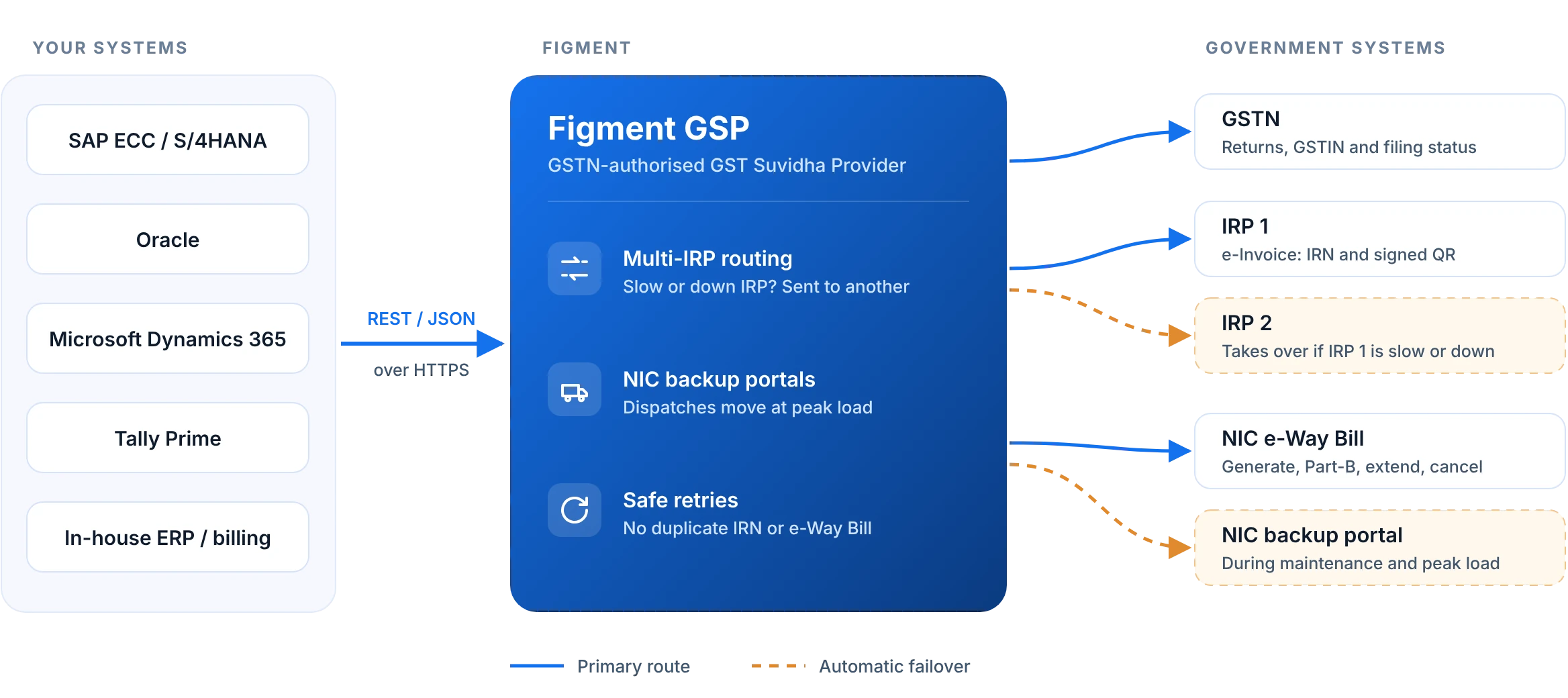
Your requests go through Figment's own authorised channel to GSTN, the IRPs and NIC. No portal scraping, no browser sessions.
Due-date volume
Batch and real-time flows sized for the 11th and the 20th.
ISO 27001 & SOC 2
AES-256 encryption, MFA and a per-transaction audit trail.
DR site, data in India
A dedicated disaster-recovery site, with all data in India.
Direct GSP vs Reseller: Choosing a GST API Provider in India
Some GST API providers are GSPs themselves. Others resell access through another company's GSP. Ask any provider these questions, including us.
How a GSP differs from an ASP is explained on the GSP APIs page.
GST API Integration With SAP, Oracle, Dynamics and Tally
The APIs take the same JSON from any system, so the work is in where your invoice or dispatch document lives.
More detail on the e-Invoice API page.
Built for Teams That Build GST Into Software
GST API for CA firms
File and reconcile for every client from your own tool.
ERP vendorsERP and Tally integration
Add GST, e-Invoice and e-Way Bill to your product.
Client: ONGC, ITCEnterprises and PSUs
IRN and e-Way Bill at billing, from SAP or Oracle.
Client: IOBBanks and fintechs
GSTIN and filing checks for onboarding and lending.
GST API Pricing: What Decides the Cost
GST API pricing in India is usually based on usage. These are the factors that decide your quote.
API volume
How many IRNs, e-Way Bills, returns and verifications you run a month, including due-date peaks.
GSTINs and entities
The number of registrations and companies using the APIs.
APIs used
Return filing, e-Invoice, e-Way Bill and verification APIs, alone or together.
Support and SLA
Uptime commitments, support hours and the tender or audit documents you need.
Frequently Asked Questions
Something not covered here?
Ask us directly.GST API integration connects your ERP, accounting software or practice tool directly to the GST system through a GST Suvidha Provider (GSP). Your software can then file returns, generate e-Invoice IRNs, create e-Way Bills and verify GSTINs without anyone logging in to the portal manually.
Request access on the page. Figment's API team confirms your use case and emails sandbox credentials with test GSTINs, sample payloads, the Postman collection and documentation.
Yes. The sandbox is separate from your live setup, so you can run the same invoices through both and compare. When you are ready, you can switch all APIs, switch a few, or keep Figment as a standby provider.
Share the APIs you use and some sample requests and responses. Figment's API team maps your fields, authentication and error codes to Figment's APIs, supports side-by-side testing and cuts over between filing windows.
Company verification (KYC), a signed agreement and production keys from Figment, typically within two weeks of sandbox access. For return-filing APIs, each taxpayer also enables API access on the GST portal and authorises it with an OTP.
The APIs are REST/JSON, so they work with SAP, Oracle, Microsoft Dynamics, Tally and in-house systems. A Postman collection and documentation come with the sandbox, and Figment's API team helps with the integration.
Yes. Figment is a GSTN-authorised GST Suvidha Provider, so requests go through Figment's own authorised channel to GSTN, the e-Invoice IRPs and NIC, with redundant links and automatic failover.
