

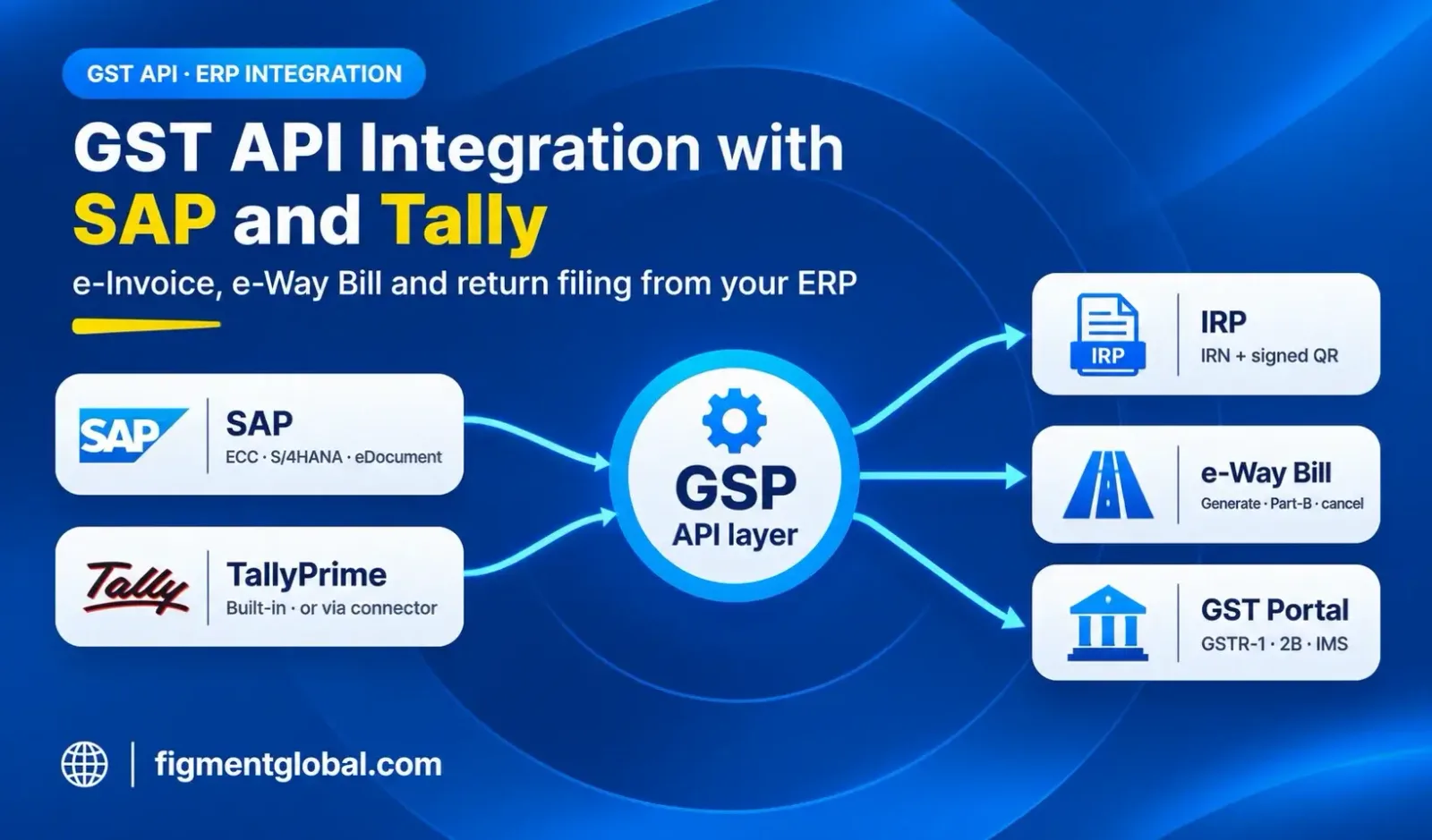
What a GST API integration covers
GST API integration with SAP
How SAP handles India e-invoicing
Integration options for SAP ECC and S/4HANA
| Option | How it works | Suits |
|---|---|---|
| SAP standard + integration layer | SAP eDocument with SAP's integration middleware connecting to a GSP | Large SAP landscapes already using SAP's compliance and integration products |
| Direct GSP connector | An ABAP or middleware connector calls the GSP's REST APIs at billing or outbound delivery and writes the IRN, QR code and e-way bill number back to the document | Companies wanting fewer layers and direct control of error handling |
| File-based (fallback) | Invoice JSON is exported, uploaded to the IRP and the response imported back | Low volumes or temporary fallback only |
What to plan for in an SAP project
Output control: the invoice print or PDF should wait for the IRN and QR code Document types: map billing types to INV, CRN and DBN, and supply types (B2B, exports, SEZ, and RCMDOM and RCMIMP for RCM self-invoices from 1 January 2027) Cancellation: link the SAP cancellation of a billing document to IRN cancellation within the 24-hour window, and to a credit note after it Multi-GSTIN: map each company code and plant to the right GSTIN and API credentials Error feedback: show IRP error codes in the cockpit or a custom report so billing teams can fix and resubmit
GST API integration with Tally
TallyPrime's built-in e-invoicing
When Tally users need a separate GST API
Tally is one of several systems. A group with SAP at head office and Tally at branches wants one GSP, one log and one reconciliation across all GSTINs. Billing happens outside Tally. Invoices come from a billing app, e-commerce platform or custom system, and Tally is used only for accounts. Volumes are high. Bulk IRN generation, scheduled e-way bill updates or multi-IRP fallback are needed. Returns and reconciliation are run centrally. GSTR-1, GSTR-2B and IMS work is done in dedicated GST software that pulls data from Tally.
SAP vs Tally: integration at a glance
| Point | SAP ECC / S/4HANA | TallyPrime |
|---|---|---|
| Built-in e-invoicing | Through eDocument with a GSP connection | Yes, through Tally GSP |
| GSP choice | Your choice of GSP | Tally GSP for built-in flow; separate GSP via connector |
| e-Way bill | Through the GSP connection | Generated with the e-invoice if enabled |
| Typical project | Integration project with IT and an SAP partner | Configuration; a connector only for special cases |
| Multi-GSTIN groups | Mapped by company code and plant | Per company, or centrally via a connector |
Pre-integration checklist
| # | Check |
|---|---|
| 1 | List every system that raises invoices, by GSTIN |
| 2 | Map document and supply types, including RCM self-invoices from 1 January 2027 |
| 3 | Clean customer masters: GSTIN, state code, PIN code |
| 4 | Check item masters: HSN codes and current GST rates |
| 5 | Decide where the IRN, QR and e-way bill number are stored on the document |
| 6 | Define the cancellation and credit-note flow |
| 7 | Test every case in a GST API sandbox |
| 8 | Complete KYC and sign the API agreement with your GSP |
| 9 | For return APIs, enable API access on the GST portal for each GSTIN and authorise it with an OTP |
| 10 | Create the e-invoice API user: API Registration → User Credentials → Create API User → Through GSP, then select your GSP |
| 11 | Create the e-way bill API user: Registration → For GSP, select your GSP and create the API username |
| 12 | Get production keys and go live one API at a time |
How Figment connects to SAP and Tally
Key takeaways
SAP integrates through its eDocument framework or a direct GSP connector. Either way you need a GSP. TallyPrime has built-in e-invoicing and e-way bill generation through Tally GSP. Tally users need a separate GST API mainly for multi-system groups, external billing or central reconciliation. Map document types, clean masters and plan cancellations before you start. Test every case in a sandbox before production keys are issued.
Frequently Asked Questions
SAP's own guidance is that a GSP tie-up is needed. Direct IRP API access is available only to taxpayers who meet NIC's eligibility criteria.
Not for the built-in flow. TallyPrime processes online e-invoicing through Tally GSP. A separate GSP is needed only if you integrate Tally with another provider's API.
Yes. A GSP API can be connected to both systems, so all GSTINs use one provider for IRNs, e-way bills and returns.
It depends on the number of company codes, document types and customisations. With Figment, production keys typically follow within two weeks of sandbox access.
The invoice cannot get an IRN until the IRP responds. Providers connected to more than one IRP can route the request to another IRP; Figment routes e-invoices across two or more IRPs. TallyPrime can export the e-invoice JSON for later upload.