

How IRP validation works
Duplicate and registration errors: the document already has an IRN Tax and value errors: tax type, rate or totals are wrong Party errors: GSTIN, state code or status problems Technical errors: authentication, sessions or malformed data
Common e-invoice API error codes and fixes
| Code | Message (as returned by the IRP) | Usual cause | Fix |
|---|---|---|---|
| 2150 | Duplicate IRN | The same invoice was sent again after an IRN was already generated, often after a timeout | Do not re-post. Fetch the existing IRN with the get-IRN-details API and store it against the invoice |
| 2295 | IRN is already generated and registered with GSTN Lookup Portal by other IRP | The same invoice was sent to two different IRPs | Use one IRP per document. Fetch the existing IRN |
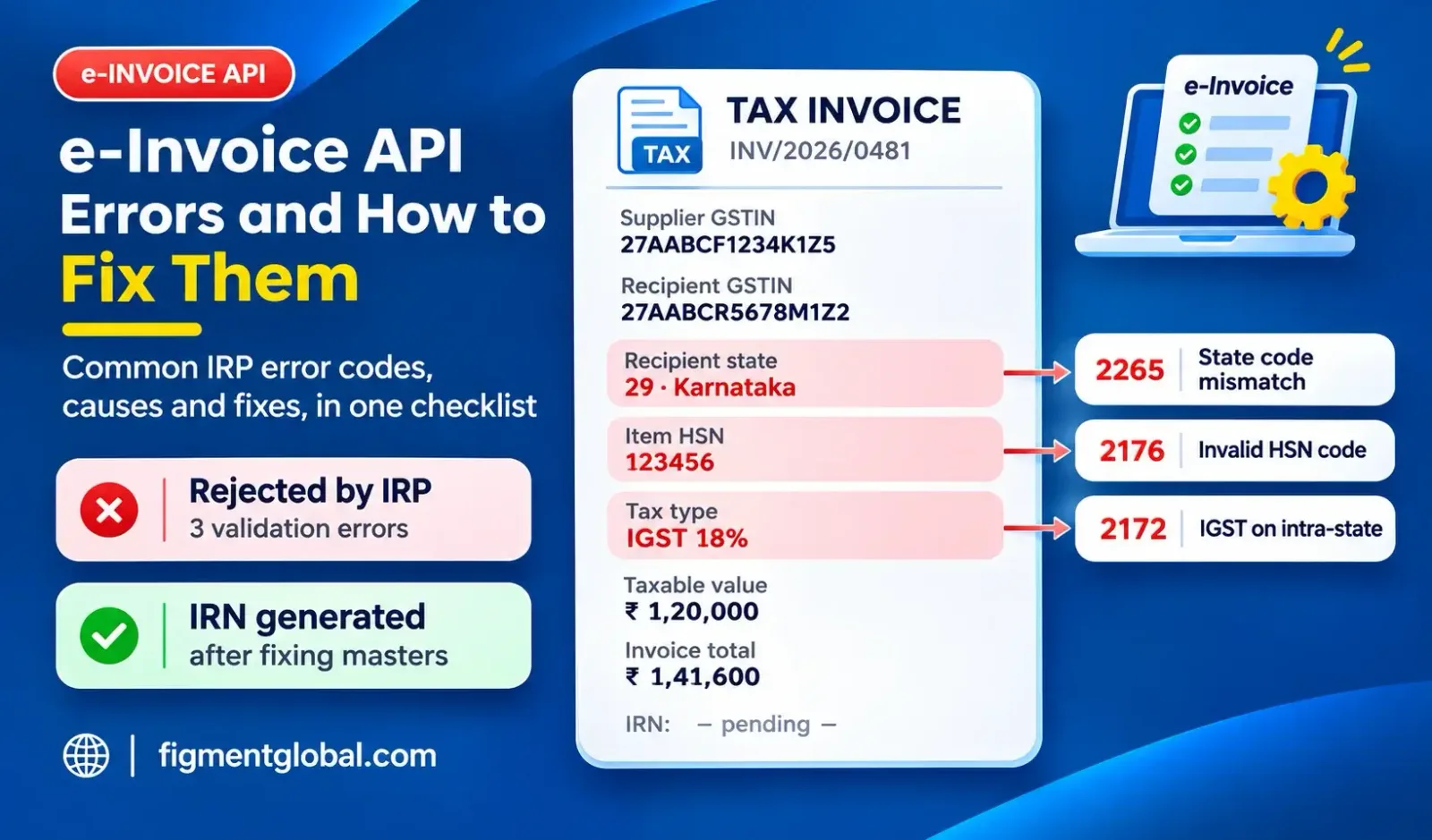
| 2172 | For intra-state transactions, IGST amounts are not applicable, only CGST and SGST amounts are applicable | IGST charged where supplier and place of supply are in the same state | Apply CGST and SGST, unless the supply is one where IGST applies by law (such as SEZ supplies) |
| 2176 | Invalid HSN code(s) | HSN code not in the IRP's master, or wrong number of digits | Correct the HSN in the item master. Check it on the e-invoice portal's HSN search |
| 2240 | Invalid GST rate for HSN | Rate does not match the HSN, or the rate list in the ERP is out of date | Update the item master. Rates changed for many goods from 22 September 2025, so check older masters |
| 2182 | The taxable value of all items must be equal to the total taxable value | Sum of line taxable values differs from the invoice-level taxable value | Recalculate totals from line items before posting. Check rounding |
| 2189 | Invalid total invoice value | Invoice total does not equal items plus other charges, less discount | Recalculate. The IRP allows only a small rounding tolerance |
| 2211 | Supplier and recipient GSTIN should not be the same | Same GSTIN entered for both parties | Correct the recipient. A GSTIN cannot issue an e-invoice to itself |
| 2212 | The recipient GSTIN cannot be URP for supply type B2B | "URP" (unregistered person) used on a B2B invoice | Enter the buyer's actual GSTIN, or treat it as a B2C invoice |
| 2265 | Recipient GSTIN state code should be the same as the state code passed in recipient details | First two digits of the buyer's GSTIN do not match the state code in the address | Correct the state code in the customer master |
| 3028 | GSTIN is not present in invoice system | Recipient GSTIN not found in the e-invoice system, often a new registration | Verify the GSTIN. Use the sync-GSTIN API or the e-invoice portal to update it, then resubmit |
| 3029 | GSTIN is not active | Recipient GSTIN is cancelled or suspended | Confirm status with the buyer. Do not invoice a cancelled GSTIN as B2B |
| 5002 | Validation Error – Invalid Reference Data | Bad or incomplete reference data in the payload | Check optional reference fields and master data; update the software if it sends old field formats |
Errors that are not code-specific but cause most delays
The 30-day reporting limit
Cancellation after 24 hours
Expired tokens and sessions
Case-sensitive invoice numbers
RCM self-invoices from 1 January 2027
Prevention checklist
| # | Control | Stops |
|---|---|---|
| 1 | Validate HSN codes and rates in the item master after every rate change | 2176, 2240 |
| 2 | Derive tax type (IGST or CGST/SGST) from supplier state and place of supply, not by hand | 2172 |
| 3 | Calculate totals from line items, with consistent rounding | 2182, 2189 |
| 4 | Verify customer GSTIN, status and state code at onboarding and before invoicing | 2211, 2212, 2265, 3028, 3029 |
| 5 | On timeout, fetch the IRN status before retrying | 2150, 2295 |
| 6 | Keep invoice numbering unique regardless of upper or lower case | 2150 |
| 7 | Assign every rejected invoice to an owner, with a fix deadline well within 30 days | 30-day limit |
| 8 | Refresh API tokens automatically | Authentication failures |
How Figment's e-Invoice API handles errors
Queued retries with no duplicates: timed-out calls are retried without registering the same invoice twice Multi-IRP routing: e-invoices are routed across two or more IRPs, so a slow IRP does not hold up invoicing
Key takeaways
Most e-invoice API errors come from HSN codes, tax type, totals, GSTIN data and duplicate submissions. Never re-post after a timeout. Fetch the IRN status first. Fix rejections quickly: businesses with AATO of ₹10 crore and above cannot report documents older than 30 days. IRN cancellation is full only and within 24 hours. After that, use a credit note or GSTR-1 amendment. Most errors are prevented by clean masters and controls in the connector.
Frequently Asked Questions
An IRN has already been generated for the document. Do not resubmit it. Fetch the existing IRN and attach it to the invoice.
Usually because the code has the wrong number of digits for your turnover, or the rate sent does not match the HSN. Check both in the item master.
Yes, after correcting it, but businesses with AATO of ₹10 crore and above must report it within 30 days of the document date.
No. After 24 hours, issue a credit note or amend the invoice details in GSTR-1.
Yes, validations and error codes are common across the six IRPs, though message wording can vary slightly.